
目录
因为一些特殊场景的需要,需要将接口的json返回渲染成markdown形式,自己处理的话还挺麻烦的,俗话说的好:站在巨人的肩膀上。下面介绍了基于Python的Json与Markdown互相转换的方式,当然你可以在Github上多搜搜看看其它的方案。
一、Json转Markdown
1、原始torsimany库
https://github.com/PolBaladas/torsimany
安装依赖库:torsimany
pip3 install torsimany使用方式:
python3 torsimany.py [JSON_FILE].json

或者

torsimany [JSON_FILE].json
假设我们有个Json格式文件:products.json,内容如下:
{
      "name":"Product",
      "properties":
      {
            "id":
            {
                  "type":"number",
                  "description":"Product identifier",
                  "required":true
            },
            "name":
            {
                  "description":"Name of the product",
                  "type":"string",
                  "required":true
            },
            "price":
            {
                  "type":"number",
                  "minimum":0,
                  "required":true
            },
            "tags":
            {
                  "type":"array",
                  "items":
                  {
                  "type":"string"
                  }
            }
      }
}
我们在终端执行如下命令,将其转化为Markdown格式文件:
torsimany products.json如果在Python3报错:AttributeError: 'str' object has no attribute 'decode'
解决方法:可以尝试修改下安装包对应的文件:./site-packages/torsimany/torsimany.py,修改内容如下: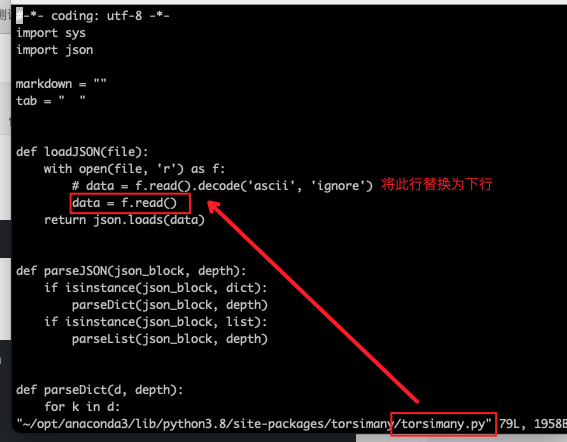
预期成功的话,会在当前目录生成:products.markdown文件,也就是markdown形式的文件,内容如下:
  * name: Product
# Properties #
* ## Id ##
  * type: number
  * description: Product identifier
  * required: True
* ## Name ##
  * description: Name of the product
  * type: string
  * required: True
* ## Price ##
  * type: number
  * minimum: 0
  * required: True
* ## Tags ##
  * type: array
* ### Items ###
  * type: string
我们通过Markdown在线工具查看效果,大概如下: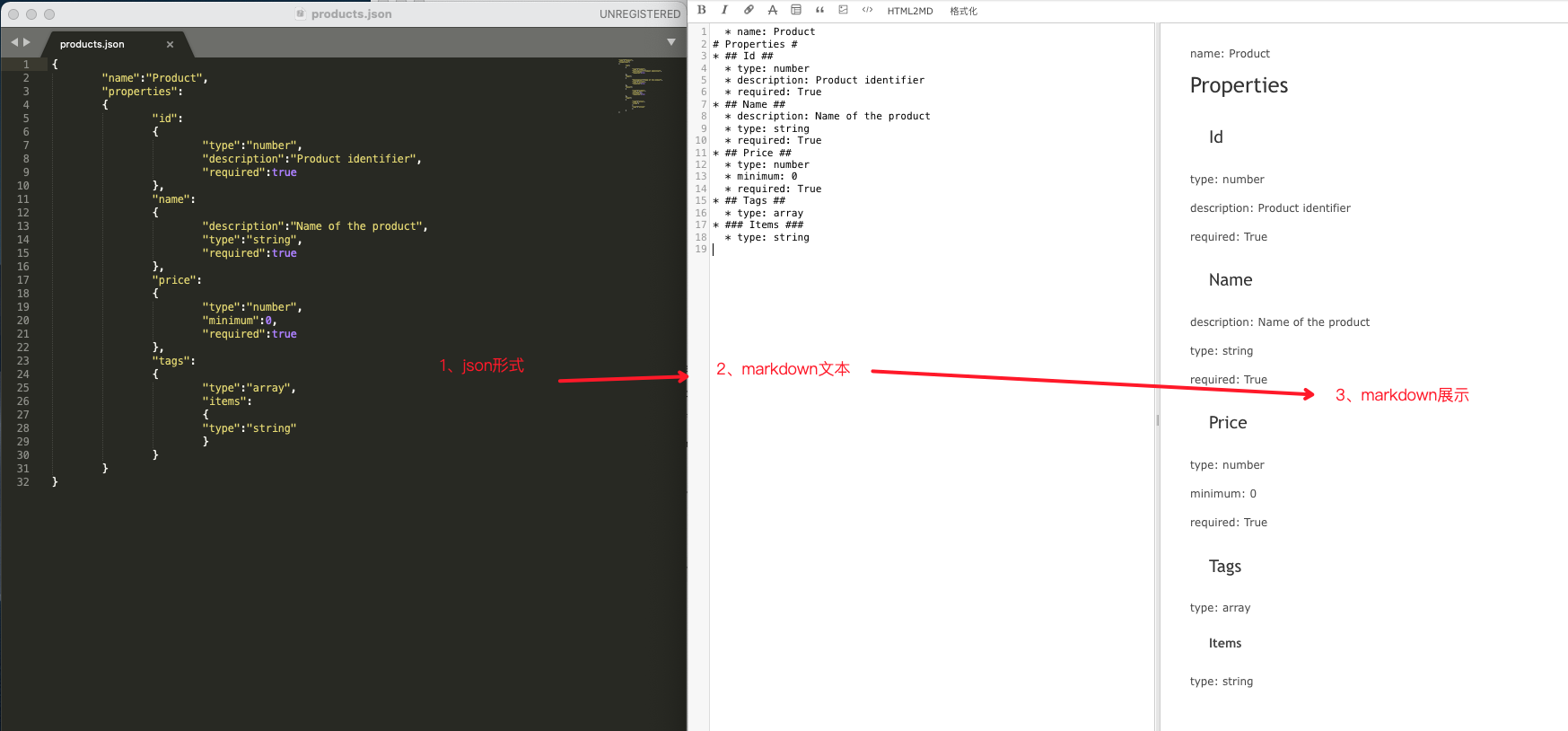
2、torsimany库修改
上述的torsimany库默认只支持文件形式的转换,其实我们日常用的比较多的是直接在线转换json文件为mardkdown的形式,于是对上面的实现进行了一些简单的改动,其实也比较简单,就一个文件,json2markdown.py
# -*- coding: UTF-8 -*-
"""
@Function:json to markdown
@Time : 2022/6/15 09:45
@Auth : https://github.com/PolBaladas/torsimany/blob/master/torsimany/torsimany.py
"""
import sys
import json


class Json2Markdown(object):
   """
   # json转markdown形式
   """

   def __init__(self):
      self.markdown = ""
      self.tab = "  "
      self.list_tag = '* '
      self.htag = '#'

   def loadJSON(self, file):
      """
      :param file:
      :return:
      """
      with open(file, 'r') as f:
         data = f.read()
      return json.loads(data)

   def parseJSON(self, json_block, depth):
      """
      :param json_block:
      :param depth:
      :return:
      """
      if isinstance(json_block, dict):
         self.parseDict(json_block, depth)
      if isinstance(json_block, list):
         self.parseList(json_block, depth)

   def parseDict(self, d, depth):
      """
      :param d:
      :param depth:
      :return:
      """
      for k in d:
         if isinstance(d[k], (dict, list)):
            self.addHeader(k, depth)
            self.parseJSON(d[k], depth + 1)
         else:
            self.addValue(k, d[k], depth)

   def parseList(self, l, depth):
      """
      :param l:
      :param depth:
      :return:
      """
      for value in l:
         if not isinstance(value, (dict, list)):
            index = l.index(value)
            self.addValue(index, value, depth)
         else:
            self.parseDict(value, depth)

   def buildHeaderChain(self, depth):
      """
      :param depth:
      :return:
      """
      chain = self.list_tag * (bool(depth)) + self.htag * (depth + 1) + \
            ' value ' + (self.htag * (depth + 1) + '\n')
      return chain

   def buildValueChain(self, key, value, depth):
      """
      :param key:
      :param value:
      :param depth:
      :return:
      """
      chain = self.tab * (bool(depth - 1)) + self.list_tag + \
            str(key) + ": " + str(value) + "\n"
      return chain

   def addHeader(self, value, depth):
      """
      :param value:
      :param depth:
      :return:
      """
      chain = self.buildHeaderChain(depth)
      self.markdown += chain.replace('value', value.title())

   def addValue(self, key, value, depth):
      """
      :param key:
      :param value:
      :param depth:
      :return:
      """
      chain = self.buildValueChain(key, value, depth)
      self.markdown += chain

   def json2markdown(self, json_data):
      """
      :param json_data:
      :return:
      """
      depth = 0
      self.parseJSON(json_data, depth)
      self.markdown = self.markdown.replace('#######', '######')
      return self.markdown


if __name__ == '__main__':
   json_data = [
      {
         "scene": "气泡触发次数过高(1小时)",
         "data": [
         ]
      },
      {
         "scene": "重点人触发气泡过多(1小时)",
         "data": [
         ]
      },
      {
         "scene": "某一气泡CTR过低(1天)",
         "data": [
            "马家春慢#0#60#0.0",
            "法曲献仙音#1#135#0.007",
            "月宫春#0#91#0.0",
            "海棠花令#0#97#0.0"
         ]
      }
   ]

   # 实例
   json2markdown_ins = Json2Markdown()

   # json转markdown
   markdown_data = json2markdown_ins.json2markdown(json_data)

   print(markdown_data)
试运行下,结果如下:
$ python3 json2markdown.py
  * scene: 气泡触发次数过高(1小时)
# Data #
  * scene: 重点人触发气泡过多(1小时)
# Data #
  * scene: 某一气泡CTR过低(1天)
# Data #
* 0: 马家春慢#0#60#0.0
* 1: 法曲献仙音#1#135#0.007
* 2: 月宫春#0#91#0.0
* 3: 海棠花令#0#97#0.0
通过Markdown在线工具看下转换后的markdown数据: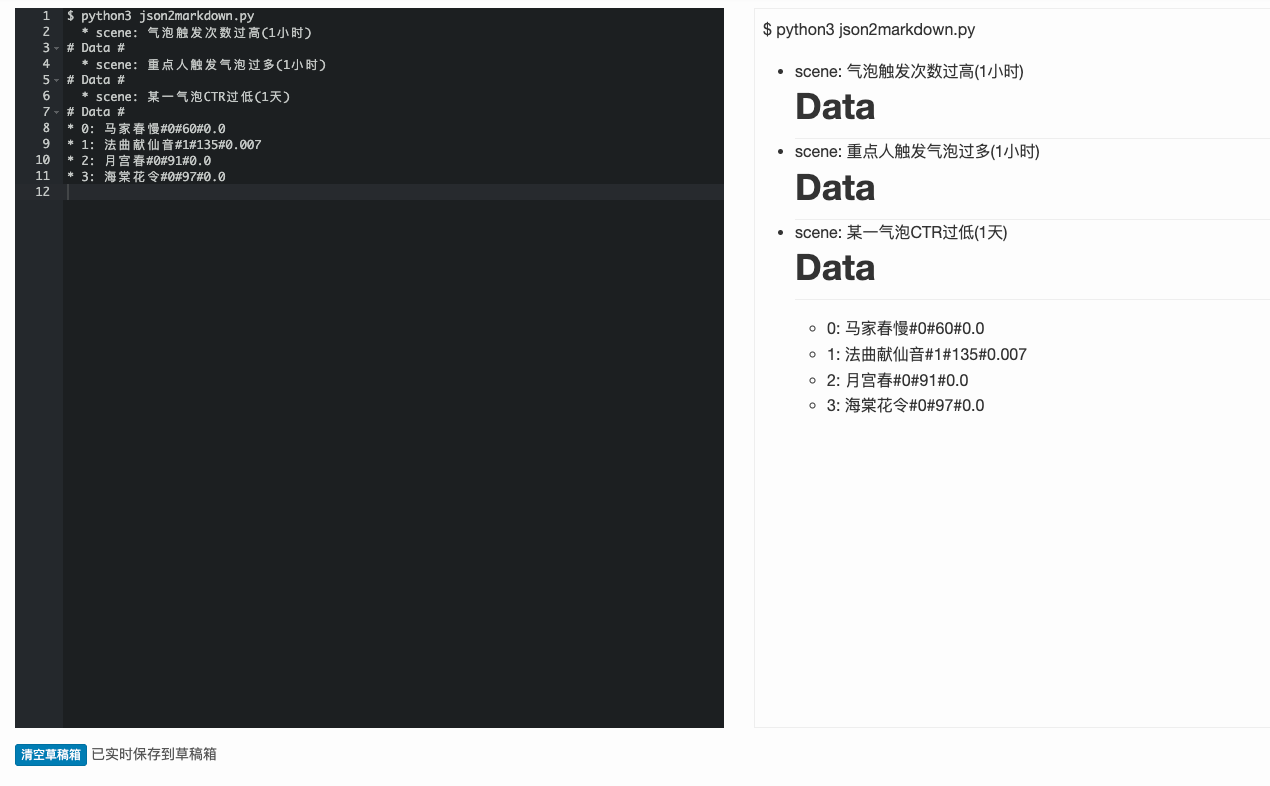
二、Markdown转Json
https://github.com/njvack/markdown-to-json
安装依赖库:markdown-to-json
pip3 install markdown-to-json使用方法:
$ md_to_json -h
Translate markdown into JSON.

Usage:
  md_to_json [options] <markdown_file>
  md_to_json -h | --help

Options:
  -h --help    Show this screen
  --version    Print version number
  -o <file>    Save output to a file instead of stdout
  -i <val>     Indent nested JSON by this amount. Use a negative number for
            most compact possible JSON. the [default: 2]
我们以products.markdown文件为例(上文生成的),命令如下,当然也可以通过-o指定写入到生成的文件。
$ md_to_json products1.markdown

# 输出结果
{
  "Properties": [
   "Id",
   [
     "type: number",
     "description: Product identifier",
     "required: True"
   ],
   "Name",
   [
     "description: Name of the product",
     "type: string",
     "required: True"
   ],
   "Price",
   [
     "type: number",
     "minimum: 0",
     "required: True"
   ],
   "Tags",
   [
     "type: array"
   ],
   "Items",
   [
     "type: string"
   ]
  ]
}