

事先准备好工具
下载分词器(选择对应的版本)版本必须和es的版本一直否则报错!
https://github.com/medcl/elasticsearch-analysis-pinyin/releases (拼音分词器)
https://github.com/medcl/elasticsearch-analysis-ik ik分词器
将分词器解压出来后,得到三个文件
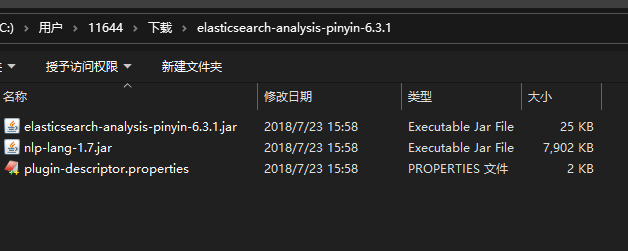
1.在es的plugins目录下新建一个pinyin的目录
shell
1
mkdir pingyin
2.将这三个文件放到pinyin的目录下
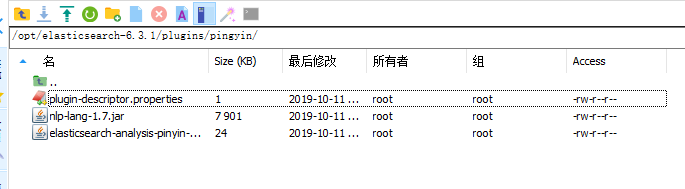
节点的配置:
- 1.删除 index
text
1
2
3
DELETE /index_name/
{
}- 2.创建一个 index_name 的 index
text
1
2
3
4
5
6
7
8
9
10
11
12
13
14
15
16
17
18
19
20
21
22
PUT /index_name/
{
    "index": {
        "analysis": {
            "analyzer": {
                "ik_pinyin_analyzer": {
                    "type": "custom",
                    "tokenizer": "ik_max_word",
                    "filter": ["my_pinyin", "word_delimiter"]
                }
            },
            "filter": {
                "my_pinyin": {
                    "type": "pinyin",
                    "first_letter": "prefix",
                    "padding_char": " "
                }
            }
        }
    }
}
- 3.修改 type 的 mapping
设置每个属性涉及到的配置
text
1
2
3
4
5
6
7
8
9
10
11
12
13
14
15
16
17
18
19
20
21
22
23
24
25
26
27
28
PUT /index_name/app/_mapping
{
    "app": {
        "properties": {
            "ProductCName": {
                "type": "keyword",
                "fields": {
                    "pinyin": {
                        "type": "text",
                        "store": false,
                        "term_vector": "with_positions_offsets",
                        "analyzer": "ik_pinyin_analyzer",
                        "boost": 10
                    }
                }
            },
            "ProductEName":{
                "type":"text",
                "analyzer": "ik_max_word"
            },
            "Description":{
                "type":"text",
                "analyzer": "ik_max_word"
            }
        }
    }
}
- 4.创建测试数据
text
1
2
3
4
5
6
DELETEPUT /index_name/app/1
{
  "ProductCName":"口红世家",
  "ProductEName":"Red History",
  "Description":"口红真是很棒的东西呢"
}- 5.测试拼音分词效果
text
1
2
3
4
5
POST /index_name/_analyze?pretty
{
  "analyzer": "pinyin",
  "text":"王者荣耀"
}





评论
登录后即可评论
分享你的想法,与作者互动
暂无评论