
动画
text
1
<a href="#_17">案例一</a> <a href="#_126">案例二</a> 一、定义动画
语法:@keyframes 动画名{from{};to{};}
from是从某状态开始 to是到某状态结束 也可以用百分比表示,把时间按百分比等分
二、引入动画
语法:animation:动画名称 动画执行时间 [延迟时间 动画曲线 执行次数 是否反向执行 是否保留最后一帧];
[]里的参数可有可无 执行次数为无限时,值为infinite 反向设置:值为alternate
在此引入一些小案例帮助理解
案例一
text
1
2
3
4
5
6
7
8
9
10
11
12
13
14
15
16
17
18
19
20
21
22
23
24
25
26
27
28
29
30
31
32
33
34
35
36
37
38
39
40
41
42
43
44
45
46
47
48
49
50
51
52
53
54
55
56
57
58
59
60
61
62
63
64
65
66
67
68
69
70
71
72
73
74
75
76
77
78
79
80
81
82
83
84
85
86
87
88
89
90
91
92
93
94
95
96
97
98
99
100
101
102
103
<!DOCTYPE html>
<html lang="en">

<head>
   <meta charset="UTF-8">
   <meta http-equiv="X-UA-Compatible" content="IE=edge">
   <meta name="viewport" content="width=device-width, initial-scale=1.0">
   <title>3d立方体</title>
   <style>
      /* 让父级动起来wrap */
      @keyframes roll {
         from {
            transform: rotateX(0) rotateY(0) rotateZ(0)
         }

         to {
            transform: rotateX(360deg) rotateY(720deg) rotateZ(360deg)
         }
      }
      }

      * {
         margin: 0;
         padding: 0;
      }

      div {
         width: 200px;
         height: 200px;
         position: absolute;
      }

      .wrap {
         /* 关键动画点 */
         /* transform-origin: 300px 300px; */
         margin: 100px;
         animation: roll 4s linear infinite;
         /* 开启3D */
         transform-style: preserve-3d;
      }

      .wrap div {
         line-height: 200px;
         text-align: center;
         font-size: 100px;
         color: #fff;
      }

      /* 左手螺旋定责。大拇指冲正方形,顺着四指是顺时针 */
      /* 左右 */
      .wrap div:nth-of-type(1) {
         /* 旋转时坐标系也会随着旋转 */
         transform: rotateY(-90deg) translateZ(100px);
         background-color: hotpink;
      }

      .wrap div:nth-of-type(2) {
         /* 旋转时坐标系也会随着旋转 */
         transform: rotateY(90deg) translateZ(100px);
         background-color: deepskyblue;
      }

      /* 上下 */
      .wrap div:nth-of-type(3) {
         /* 旋转时坐标系也会随着旋转 */
         transform: rotateX(90deg) translateZ(100px);
         background-color: gold;
      }

      .wrap div:nth-of-type(4) {
         /* 旋转时坐标系也会随着旋转 */
         transform: rotateX(-90deg) translateZ(100px);
         background-color: greenyellow;
      }

      /* 前后 */
      .wrap div:nth-of-type(5) {
         /* 旋转时坐标系也会随着旋转 */
         transform: translateZ(100px);
         background-color: tomato;
      }

      .wrap div:nth-of-type(6) {
         /* 旋转时坐标系也会随着旋转 */
         transform: rotateX(180deg) translateZ(100px);
         background-color: orange;
      }
   </style>
</head>

<body>
   <div class="wrap">
      <div>A</div>
      <div>B</div>
      <div>C</div>
      <div>D</div>
      <div>E</div>
      <div>F</div>
   </div>
</body>

</html>
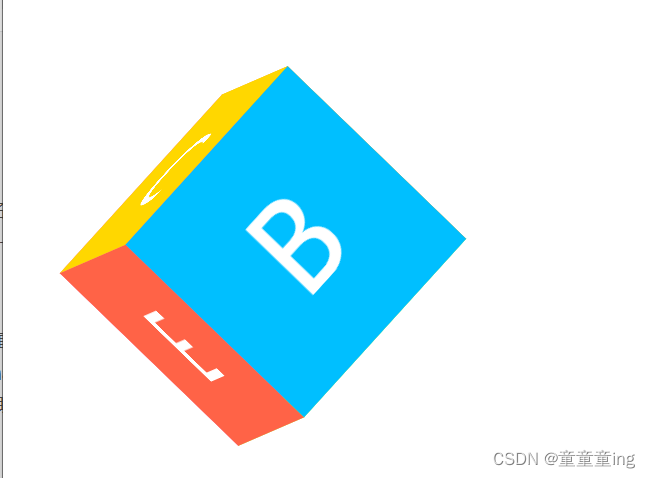
这是一个可以旋转的正立方体
案例二
text
1
2
3
4
5
6
7
8
9
10
11
12
13
14
15
16
17
18
19
20
21
22
23
24
25
26
27
28
29
30
31
32
33
34
35
36
37
38
39
40
41
42
43
44
45
46
47
48
49
50
51
52
53
54
55
56
57
58
59
60
61
62
63
64
65
66
67
68
69
70
71
72
73
74
75
76
77
78
79
80
81
82
83
84
85
86
87
88
89
90
91
92
93
94
95
96
97
98
99
100
101
102
103
104
105
106
107
108
109
110
111
112
113
114
115
116
117
118
119
120
121
122
123
<!DOCTYPE html>
<html lang="en">

<head>
   <meta charset="UTF-8">
   <meta http-equiv="X-UA-Compatible" content="IE=edge">
   <meta name="viewport" content="width=device-width, initial-scale=1.0">
   <title>case06</title>
   <style>
      @keyframes jump {
         0% {
            top: 80px;
            transform: rotate(0deg);
         }

         12.5% {
            top: 100px;
            border-bottom-right-radius:50px;
            border-top-right-radius: 10px;
            border-top-left-radius: 10px;
            border-bottom-left-radius: 10px;
         }

         25% {
            top: 80px;
            border-bottom-right-radius:10px ;
            border-top-right-radius: 10px;
            border-top-left-radius: 10px;
            border-bottom-left-radius: 10px;
         }

         37.5% {
            top: 100px;
            border-bottom-right-radius:10px ;
            border-top-right-radius: 50px;
            border-top-left-radius: 10px;
            border-bottom-left-radius: 10px;
         }

         50% {
            top: 80px;
            border-bottom-right-radius:10px ;
            border-top-right-radius: 10px;
            border-top-left-radius: 10px;
            border-bottom-left-radius: 10px;
         }

         62.5% {
            top: 100px;
            border-bottom-right-radius:10px ;
            border-top-right-radius: 10px;
            border-top-left-radius: 50px;
            border-bottom-left-radius: 10px;
         }

         75% {
            top: 80px;
            border-bottom-right-radius:10px ;
            border-top-right-radius: 10px;
            border-top-left-radius: 10px;
            border-bottom-left-radius: 10px;
         }

         87.5% {
            top: 100px;
            border-bottom-right-radius:10px ;
            border-top-right-radius: 10px;
            border-top-left-radius: 10px;
            border-bottom-left-radius: 50px;
         }

         100% {
            top: 80px;
            transform: rotate(360deg);
            border-bottom-right-radius:10px ;
            border-top-right-radius: 10px;
            border-top-left-radius: 10px;
            border-bottom-left-radius: 10px;
         }
      }
      @keyframes scaleShadow{
         from{transform: scaleX(1);}
         to{ transform: scaleX(1.2);}
      }
      .bg {
         width: 300px;
         height: 300px;
         background-color: skyblue;
         position: relative;
      }

      .bg .jump {
         width: 100px;
         height: 100px;
         background-color: #fff;
         position: absolute;
         left: 100px;
         top: 80px;
         border-radius: 10px;
         animation: jump 2s linear infinite;
      }
      .shadow{
         width: 80px;
         height: 20px;
         background-color: #666;
         position: absolute;
         left: 110px;
         top: 190px;
         border-radius: 50%;
         animation: scaleShadow 0.25s linear infinite alternate;
      }
   </style>
</head>

<body>
   <div class="bg">
      <div class="shadow"></div>
      <div class="jump"></div>
   </div>
</body>

</html>
动画效果运行代码可见
注意
修改旋转点:transform-origin 开启3d:transform-style:preserve-3d; 旋转时,坐标系也会跟着旋转*