
MarkDown的使用简介
1、MarkDown概述
1.1、什么是MarkDown
MarkDown是一种轻量级标记语言,使用易读易写的纯文本格式编写文档。
2004年由约翰·格鲁伯创建。使用MarkDown编写的文档可以导出HTML、Word、图像、PDF、Epub等多种格式的文档。MarkDown编写的文档,后缀名为.md或.markdown。
当前许多网站都广泛使用 Markdown 来撰写帮助文档或是用于论坛上发表消息。甚至一些软件也集成了MarkDown功能,比如:有道云、VSCode、简书、Github、CSDN等都支持Markdown写作。甚至vuepress也支持部分Markdown(部分语法)搭建博客页面。
1.2、MarkDown编辑器
1)Typora编辑器;
2)Visual Studio Code
3)在线编辑:在线markdown编辑器_微信公众号markdown排版工具
Typora编辑器快捷键:
1)标题 (快捷键:ctrl + 数字)
2)表格:(ctrl + T)
2、MarkDown基本语法
基础语法参考:我的文章
3、MarkDown高级语法
3.1、设置字体样式
1)设置字体颜色
<font face="黑体">我是黑体字</font>
<font face="微软雅黑">我是微软雅黑</font>
<font face="STCAIYUN">我是华文彩云</font>
<font color=red>我是红色</font>
<font color=#008000>我是绿色</font>
<font color=Blue>我是蓝色</font>
<font size=5>我是字体大小</font>
<font face="黑体" color=green size=5>我是黑体,绿色,字体大小为5</font>
2)设置表格背景色
<table><tr><td bgcolor=yellow>背景色yellow</td></tr></table>nn3)设置文字居中
<center>居中</center>

左对齐


右对齐

4)加入上下标
双氧水:H<sub>2</sub>O<sub>2</sub>
二氧化碳:CO<sub>2</sub>
案例1效果:
我是黑体字
我是微软雅黑
我是华文彩云
我是红色
我是绿色
我是蓝色
我是尺寸
我是黑体,绿色,尺寸为5
案例2效果:
案例3效果:
案例4效果:
双氧水:H2O2
二氧化碳:CO2
3.2、数学公式
MarkDown可以插入 LaTex 数学公式。支持行内公式以及公式块。
1)行内公式:$内联公式$
默认是不支持的,需要我们在文件-偏好设置中设置一下:勾上内联公式
案例1效果:行内公式
我是行内公式:$x^4$
2)(行间)公式块:$$ 行间公式 $$
案例2效果:基本数学公式
$$
x=\frac{-b\pm\sqrt{b^2-4ac}}{2a}
$$
案例3效果:一维薛定谔方程
$$
i \hbar \frac{\partial}{\partial t} \Psi(\boldsymbol{r}, t)=-\frac{\hbar^{2}}{2 m} \nabla^{2} \Psi(\boldsymbol{r}, t)+V(\boldsymbol{r}, t) \Psi(\boldsymbol{r}, t)
$$
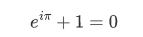
案例4效果:欧拉公式
$$
e^{i\pi}+1=0
$$
4、Mermaid绘图
Mermaid 可让您使用文本和代码创建图表和可视化效果。它是一种基于 Javascript 的图表和图表工具,可呈现受 Markdown 启发的文本定义以动态创建和修改图表。
详细的介绍可以在这里查看:mermaid
Mermaid能绘制哪些图:
饼状图:使用pie关键字
流程图:使用graph关键字
序列图:使用sequenceDiagram关键字
甘特图:使用gantt关键字
类图:使用classDiagram关键字
状态图:使用stateDiagram关键字
用户旅程图:使用journey关键字
其他图形
4.1、pie chart(饼图)
语法:
pie
   title [提供标题]-可选项
   "选项" : 数值(最多支持两位小数)
例如:
pie
   title 消费详情
   "早餐" : 10
   "午餐" : 15
   "话费" : 30
   "其他" : 65
案例效果:
4.2、Flowchart(流程图)
语法:
graph 方向描述[TB 从上到下/BT 从下到上/RL 从左到右/LR 从右到左]
   1)支持以下节点:用id表示一个节点符号内文字为节点内容
   id[文字] 矩形节点
   id(文字) 圆角矩形节点
   id((文字)) 圆形节点
   id>文字] 右向旗帜状节点
   id{文字} 菱形节点
   2)节点之间的连接:使用以下符号
   > 添加尾部箭头
   – 不添加尾部箭头/单线
   –text– 单线上加文字
   == 粗线
   ==text== 粗线加文字
   -.- 虚线
   -.text.- 虚线加文字
   3)支持添加子表
   subgraph 子图表名称
      子图表中的描述语句...
   end
   4)支持一些特定的样式
   style id2 fill:#bbf,stroke:#f66,stroke-width:2px,color:#fff,stroke-dasharray: 5 5
注:官网用的是Flowchart,在markdown中 graph更为美观。
使用案例1:
graph TD
   A[Start] --> B{Is it?};
   B -- Yes --> C[OK];
   C --> D[Rethink];
   D --> B;
   B -- No ----> E[End];
案例1效果:
使用案例2:
graph TB
   c1-->a2
   subgraph ide1 [one]
   a1-->a2
   end
案例2效果: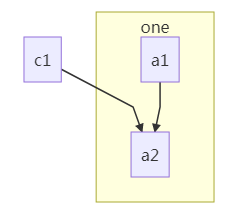
使用案例3:
graph LR
   classDef className fill:#f9f,stroke:#333,stroke-width:4px
   id1(Start)-->id2(Stop);
   class id1 className;
   style id2 fill:#bbf,stroke:#f66,stroke-width:2px,color:#fff,stroke-dasharray: 5 5
案例3效果: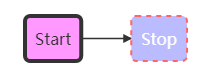
4.3、sequence Diagram (序列图)
比起官网的,在markdown中还是有部分标记无法生效的。
语法:
sequenceDiagram
   [参与者1][消息线][参与者2]:消息体
   ...
   1)participant 用于声明参与者,也可以用来为参与者取别名(默认文本矩形)
   participant Alice
   participant A as Alice 可以直接使用A代替Alice
   注:actor 声明不生效
   2)消息线的使用
   ->无箭头实线
   -->无箭头虚线
   ->>带箭头的实线
   -->>箭头虚线
   -x实线,末端有一个十字
   --x末端带有十字的虚线。
   -)末端带有开放箭头的实线(异步,不生效)
   --)末端带有开放箭头的虚线(异步,不生效)
   3)Note 位置表述 参与者: 标注文字
     right of 右侧
     left of 左侧
     over 在当中,可以横跨多个参与者
   4)支持循环语法
   loop 循环的条件
      循环体描述语句
   end
   5)判断
   alt 条件 1 描述
      分支 1 描述语句
   else 条件 2 描述 # else 分支可选
      分支 2 描述语句
   else ...
      ...
   end
   如果只有if没有else还可以使用:
   opt 条件描述
      分支描述语句
   end
使用案例1:
sequenceDiagram
   Alice->>John: Hello John, how are you?
   John-->>Alice: Great!
   Alice-xJohn:See you later!
案例1效果: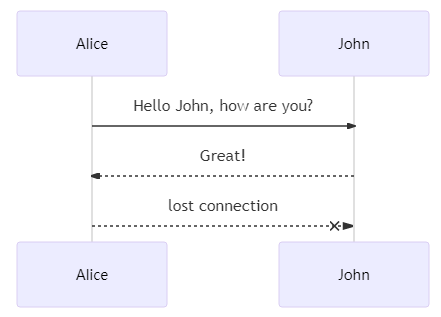
使用案例2:
sequenceDiagram
   participant z as 张三
   participant l as 李四
   loop 日复一日
      z->>l: 吃了吗您呐?
      l-->>z: 吃了,您呢?
      activate z
      Note left of z: 想了一下
      alt no-还没吃
         z-xl: 还没呢,正准备回去吃
      else yes-已经吃了
         z-xl: 我也吃过了,哈哈
      end
      opt newYear
         l-->z: 祝您新年好啊
      end
   end
案例2效果: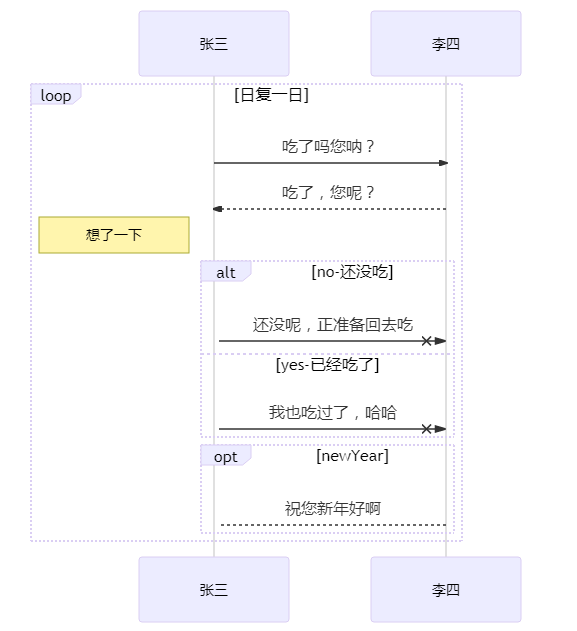
4.4、gantt(甘特图)
甘特图是一类条形图,将每个计划任务记录为一个从左向右延伸的连续条。x轴代表时间,y轴记录不同的任务及其完成顺序。由Karol Adamiechi在1896年提出, 而在1910年Henry Gantt也独立的提出了此种图形表示。通常用在对项目终端元素和总结元素的开始及完成时间进行的描述。使用案例:
gantt
   dateFormat  YYYY-MM-DD //时间格式
   title   Adding GANTT diagram functionality to mermaid //甘特图名称
   excludes   weekends //不包括周末
   %% (`excludes` accepts specific dates in YYYY-MM-DD format, days of the week ("sunday") or "weekends", but not the word "weekdays".)

   section A section  //模块-名称A section
   //done已经完成
   Completed task         :done,   des1, 2021-01-06,2021-01-08
   //active当前正在进行
   Active task            :active,  des2, 2021-01-09, 3d
   //Future后续待处理
   Future task            :       des3, after des2, 5d
   Future task2           :       des4, after des3, 5d

   section Critical tasks
   //crit关键任务,done已完成
   Completed task in the critical line :crit, done, 2021-01-06,24h
   Implement parser and jison        :crit, done, after des1, 2d
   Create tests for parser          :crit, active, 3d
   Future task in critical line      :crit, 5d
   Create tests for renderer         :2d
   Add to mermaid                 :1d
   Functionality added             :milestone, 2021-01-25, 0d
案例效果: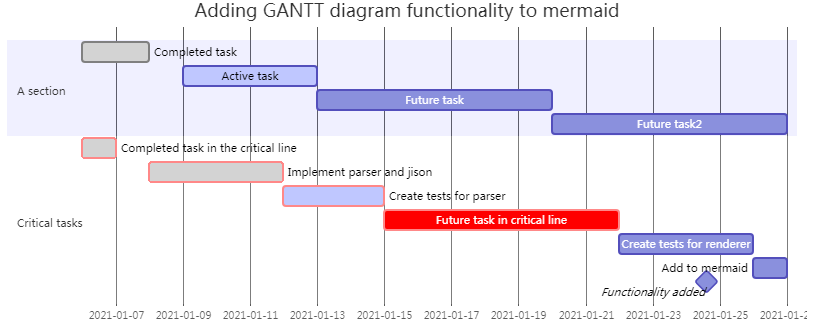
4.5、classDiagram(类图)
UML提供了表示类成员的机制,例如属性和方法,以及关于它们的附加信息。语法:
classDiagram
   1)direction 方向描述[TB 从上到下/BT 从下到上/RL 从左到右/LR 从右到左]
   2)表明属性的类型和方法的返回类型
   + Public
   - Private
   # Protected
   $ Static
   * Abstract Method
   3)类与类之间的关系
   <|-- Inheritance 继承
   *--    Composition 组合
   o--    Aggregation 聚合
   -->    Association 关联
   --    Link (Solid)
   ..>    Dependency 依赖
   ..|> Realization 实现(implements)
   ..    Link (Dashed)
   4)对象的个数
   1 Only 1
   0..1 Zero or One
   1..* One or more
   * Many
   n n {where n>1}
   0..n zero to n {where n>1}
   1..n one to n {where n>1}
使用案例:
classDiagram
  direction RL
  class Student {
   -idCard : IdCard
  }
  class IdCard{
   -id : int
   -name : string
  }
  class Bike{
   -id : int
   -name : string
  }
  Student "1" --o "1" IdCard : carries
  Student "1" --o "1" Bike : rides
案例效果: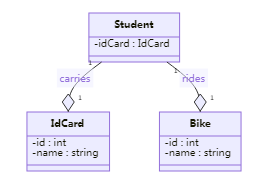
4.6、stateDiagram(状态图)
状态图是计算机科学和相关领域中用来描述系统行为的一种图。状态图要求所描述的系统由有限数量的状态组成。如:一个对象的声明周期。
使用案例:
stateDiagram-v2
   state if_state <>
   [*] --> IsPositive
   IsPositive --> if_state
   if_state --> False: if n < 0
   if_state --> True : if n >= 0
案例效果: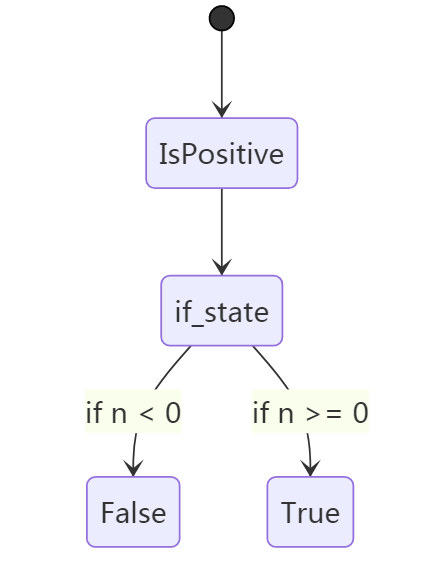
4.7、journey(用户旅程图)
用户旅程详细描述了不同用户在系统、应用程序或网站中完成特定任务所采取的具体步骤。此技术显示当前用户工作流,并揭示未来工作流的改进领域。使用案例:
journey
   title My working day
   section Go to work
     Make tea: 5: Me
     Go upstairs: 3: Me
     Do work: 1: Me, Cat
   section Go home
     Go downstairs: 5: Me
     Sit down: 5: Me
案例效果: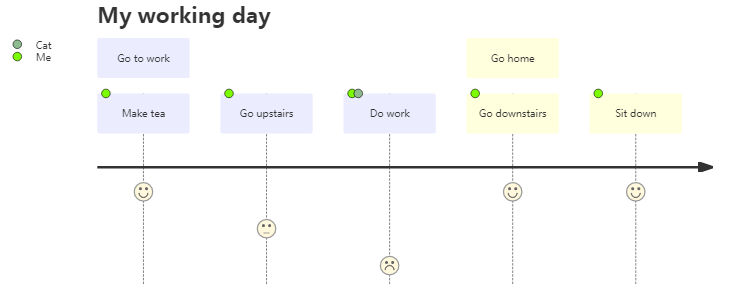
4.8、其他图形
使用案例:
gitGraph:
options
{
   "nodeSpacing": 130,
   "nodeRadius": 10
}
end
commit
branch newbranch
checkout newbranch
commit
commit
checkout master
commit
merge newbranch
案例效果:
5、支持emoji表情
| :angry:😠 | :astonished:😲 | :cold_sweat:😰 | :cry:😢 | :disappointed:😞 |
|---|---|---|---|---|
| :dizzy_face:😵 | :fearful:😨 | :grin:😁 | :heart_eyes:😍 | :kissing_closed_eyes:😚 |
| :kissing_heart:😘 | :laughing:😆 | :neutral_face:😐 | :pensive:😔 | :persevere:😣 |
| :rage:😡 | :relieved:😌 | :smile:😄 | :smiley:😃 | :smirk:😏 |
| :tired_face:😫 | :unamused:😒 | :rage:😡 | :scream:😱 | :tired_face:😫 |
| :weary:😩 | yum:😋 | ...... |